← All workCase study / 01

Public early access · Launched October 2026

Hustle

A live web app for UK workers with more than one job.

I built it while juggling two jobs: one rota in Microsoft Teams, another in a terrible web portal, and no easy way to see if I had Friday off or could afford rent.

Visit website Source is private

Film transcript: Silent 20-second product film with example data. Shift cards for two jobs, The café and Care home, gather into one place. A café rota table is snapped and becomes shift cards. Shifts from both jobs line up in one calendar. A list of October paydays appears with an estimated in-hand total, labelled estimate only. The question "When's my next payday?" is answered with Friday 9 October. The film ends on the Hustle home screen on a phone beside the line "Two jobs. One place."

Role
Solo project · AI-assisted
Year
2026
Platform
Web · installs on phones
Status
Public early access
Stack

01At a glance

The 30‑second version.

Why I built it

I was working two jobs: checking Microsoft Teams for one rota, logging into a terrible web portal for the other, and doing mental gymnastics to work out whether I had Friday off or could afford rent. Lots of people with two jobs live like this, paid on different days by different payrolls.

Product

So I built Hustle. It pulls both rotas into one calendar and estimates take-home pay for each payday, using each job's own pay rules and UK PAYE and National Insurance, so I can look at my phone and see where I stand. Rotas can be imported from a screenshot with AI.

Outcome

Launched in October 2026 at hustlepay.co.uk: public sign-up, real accounts, free during early access.

3,500+

Automated tests: unit, render, rules and browser

27

Firestore security-rules tests on the emulator

10

Playwright checks of the production build

5

Rota screenshots per AI import, checked before saving

02Experience

Snap the rota. See payday coming.

Built phone-first for people on their feet all day. The home screen shows this week's shifts, the next paydays and an estimate of what's coming in.

  1. 01
    Snap

    Add up to five rota screenshots, or paste the rota as text. Hustle can detect which job it's for.

  2. 02
    Check

    AI reads the rota, then every shift appears in a preview, matched to your jobs. Nothing is saved until you confirm.

  3. 03
    Plan

    Shifts from every job land in one calendar, with clash warnings, leave, overtime and protected days you keep free.

  4. 04
    Know

    Each payday shows an estimate of take-home pay after PAYE tax and National Insurance, labelled as an estimate.

Recording: Silent recording with example data: on Import rota, a café rota screenshot is added and the job chosen. After Parse rota with AI, a preview lists four shifts with a reminder to check every shift, and the Import 4 shifts button. (14 seconds.)

Real recording, example data: a rota screenshot becomes four shifts to check.
Per payroll

Pay & paydays

Each job's rates, night extras, holiday pay, overtime and pay dates, with PAYE and NI worked out per payroll run. Missing details show why there's no figure, never a misleading £0.

Ask

Ask about your pay

Questions like “When's my next payday?” Simple ones are answered on the device without AI; others send only the data the question needs.

Privacy

Hide amounts

No bank connection. One tap turns every £ figure into shimmering ink, for checking pay in public.

Recording: Silent recording of the Hustle home screen with a synthetic demo account: the estimated in-hand figure for October, this week's calendar strip, today's shift and the list of paydays. (23.7 seconds.)

Home: this week and the estimate.

Recording: Silent recording with example data: the Pay screen shows the estimated in-hand figure, the split of gross pay into take-home, PAYE tax and employee National Insurance, then scrolls through October's paydays and pay by job. (8.5 seconds.)

Pay: where the gross goes.

Recording: Silent recording with example data: the home screen shows an estimated £501.60 in hand with gross, tax and NI. The eye icon is tapped and every amount turns into shimmering ink. A figure is pressed and held, shows £501.60 briefly, then returns to ink. (9.5 seconds.)

Hide amounts: tap for ink, hold to peek.

Recording: Silent recording with example data: the chat screen suggests questions, "When's my next payday?" is asked, and Hustle answers Friday 9 October with the job and estimated amount, noting it was answered on the device without AI. (7.4 seconds.)

Chat: answered from saved shifts.
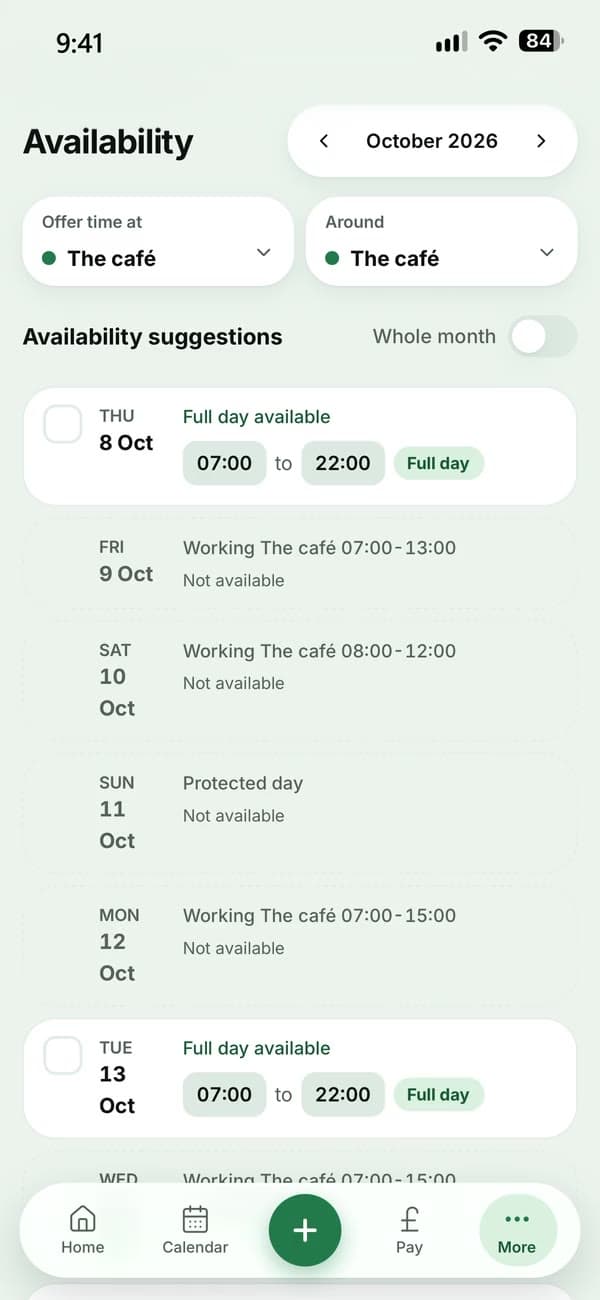
Hustle's Availability screen with example data: suggested free time for The café, days already working at the café, and a protected day kept free.
Availability: free time and protected days.
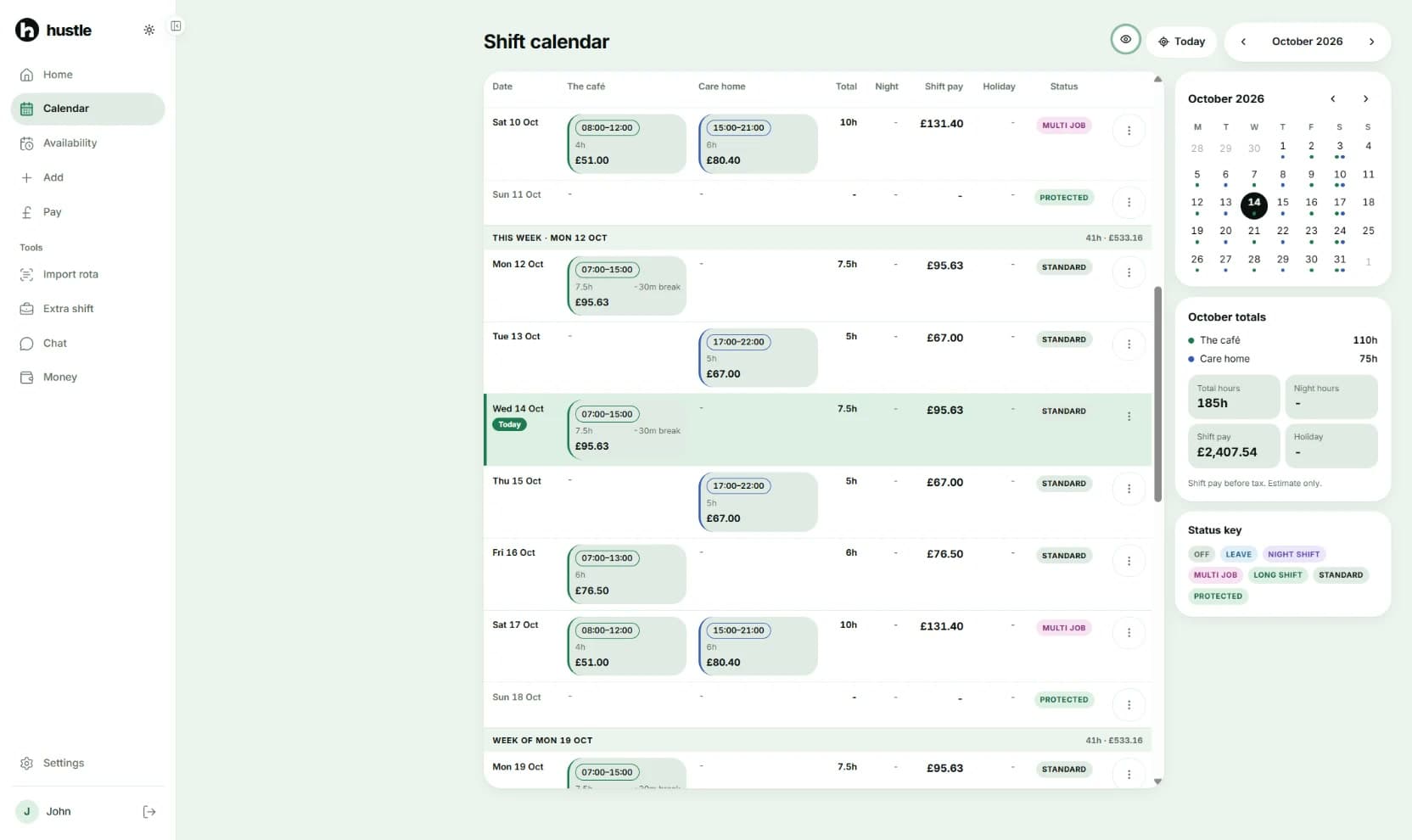
Hustle's shift calendar on desktop with example data: The café and Care home in side-by-side columns, each day's hours, shift pay and status (standard, multi job or protected), a month picker and October totals.
On desktop: both jobs side by side, with each day's hours, pay and status.

03Architecture

Private by default, checked on the server.

One Next.js codebase serves the public site and the app. Keys, AI and email stay on the server, and each user's data lives under their own account.

Next.js 16 · React 19 · TypeScript · Tailwind CSS 4 · ZustandFirebase Auth + Firestore · hosted on Vercel

  1. Client

    Installable web appPhone-first, home screen

  2. Sign-in

    Firebase AuthEmail or Google

  3. Server

    Route handlersToken and origin checked

  4. Data

    FirestoreOnly your own records

    AI

    OpenAIOutput validated with Zod

  5. Keys

    Cloud KMSEncrypts saved AI keys

Money in whole pence
Stored amounts are integers, and strict decoders set malformed records aside instead of silently rewriting them.
Layered pay logic
Small pure functions in one-way layers: gross pay, then paydays, then PAYE and NI. An architecture test enforces the direction.
No silent overwrites
Job settings save by revision in a transaction. If another device changed them first, your draft is kept and you're asked to retry.

04Challenges

Three problems with real stakes.

Pay figures people plan around, a secret they trust the app with, and AI output that can't be trusted on its own.

Challenge 01 · Payroll

Two payrolls, one honest estimate.

  • Gross pay
  • Allocated to paydays
  • PAYE per payroll run
  • NI per payroll run
symptom
Each job has its own rates, night extras, holiday-pay method, overtime and pay dates, and UK tax is worked out per payroll run, cumulatively or week-1. A confident wrong number is worse than none.
investigation
Split the calculation into small pure functions in layers: gross pay, then allocation to pay dates, then PAYE and National Insurance per run, with each tax year's data kept separate. Every rule has table-driven tests.
decision
Store money as whole pence, label every figure an estimate, and explain a missing figure instead of showing £0. In live use, a floating-point rounding tail made some valid shifts show their pay as “unavailable” in the calendar; it was traced and fixed, with regression tests added.
result
Per-payday estimates for weekly, four-weekly and monthly payrolls, for the 2026/27 tax year and NI category A.
Challenge 02 · Bring your own AI key

Protected at rest. Never exposed to the browser.

  • Encrypted with Cloud KMS
  • Bound to the account
  • No stored cloud credentials
  • Fails closed
symptom
People can save their own OpenAI key. On serverless hosting, the app has to keep that key secret without holding long-lived cloud credentials.
investigation
The key is encrypted with Google Cloud KMS, with additional authenticated data that binds it to the account, and integrity-checked. Vercel reaches Google Cloud through OIDC workload identity federation, so no cloud key file is stored.
decision
The server decrypts the key only to make an authorised OpenAI request for that user. It is never sent back to the browser, saving or removing it needs a recent sign-in, and if decryption fails the request fails instead of quietly switching to shared AI.
result
Saved keys are encrypted at rest and never exposed to the browser. It is not end-to-end encryption: the server can decrypt the key to call OpenAI.

Challenge 03 · AI rota import

Untrusted AI output, checked twice.

  • Bounded request
  • Zod-validated output
  • Matched to your jobs
  • You confirm
symptom
Rota screenshots are messy, the model's answer can be wrong, and text in a rota can try to give the model instructions.
investigation
Requests are bounded: up to five images, or pasted text. The model's output is validated against a strict Zod schema, then checked against the user's known jobs.
decision
Every shift is shown in a preview the user confirms. Stable IDs are assigned only once the whole preview is valid, and images are never loaded from model output. Free AI has monthly allowances plus burst and daily limits on the server.
result
Invalid model output can't reach saved data. Accuracy still depends on the image and the model, which is why the preview asks people to check every shift.

05Shipping

Live, tested, protected.

Accounts, security, privacy and tests: the work that turns an app into a product other people can sign up for.

Automated tests

3,500+ tests.

  • 3,583 Vitest unit and render tests
  • 27 Firestore rules tests on the emulator
  • 10 Playwright checks of the production build
  • TypeScript, lint and build clean

CI/CD

Every change checked first.

A required GitHub Actions job runs typecheck, lint, build, Vitest and Playwright on every pull request, with rules tests when the rules change. Vercel deploys main and builds a preview for each change.

Security

Defence in depth.

Firestore rules keep each user to their own data · ID tokens verified with revocation checks · nonce Content Security Policy · origin, content-type and size checks on APIs · rate limits per account, device and inbox · AI security scan: one low finding, fixed

Privacy

No bank connection.

Hide amounts in one tap · analytics only after consent · IP addresses discarded · no recordings or typed text collected · account deletion runs on the server

Accounts

Real sign-up and recovery.

email or Google sign-in · email verification · password reset on Hustle's own pages · guided setup, job by job · in-app account deletion

Installable

Feels like an app.

web app manifest and icons · install page with a QR code · phone bottom bar · safe-area and keyboard handling · 44px tap targets, reduced motion

06Status

Public early access, honestly.

Real accounts and real data, free during early access. It's useful today, and it isn't finished.

Working now

  • Multi-job calendar
  • Shifts, overtime, holiday, sick and unpaid leave
  • Availability planner
  • Extra-shift checker
  • Payday and take-home estimates
  • PAYE (cumulative and week-1) and NI
  • AI rota import
  • AI chat
  • Hide amounts
  • Bring your own OpenAI key
  • Install to home screen

Next on the list

  • More tax years
  • NI categories beyond A
  • Pensions and student loans
  • Move the last shift-pay maths to whole pence
  • Payslip upload
  • Earnings target and “safe to spend”
  • Reminders
  • Offline mode
  • Paid plan

Estimates cover the 2026/27 UK tax year and National Insurance category A only, and don't yet include pension or student loan deductions. Every figure is labelled an estimate. There's no offline mode.

07My role

What I did, and how.

Hustle was designed, directed, tested and shipped by me using AI-assisted development. I owned the product idea, who it is for, the pay rules and every design direction; tested it on real devices; and set up and ran production. The code was written largely with AI coding agents working under my direction, rules and review.

✦ Built with AI coding tools

Concept
The product idea: one place for people with more than one job to see their shifts, their take-home pay and when it arrives.
Problem
Defined who it is for, UK hourly workers with two or more jobs, and the scope and priorities for early access.
Requirements
Set the product rules: every figure is labelled an estimate and never shown as a misleading £0, no bank connection, and privacy by default.
Direction
Approved every design direction, from the brand and full redesign to the invisible-ink Hide amounts.
Technical decisions
Set the release policy: required CI checks on every change, with auto-merge only when they pass.
Testing
Tested on a real iPhone and desktop browsers, and found real bugs in use, including an iPhone-only rendering bug and a calendar pay bug.
AI-assisted implementation
Implementation was written largely with AI coding agents (Claude Code, and Codex earlier) under my direction and review.

08Learned

Lessons I'll keep.

Say it's an estimate

Labelling every figure, and explaining a missing one, builds more trust than a confident wrong number.

Never trust model output

Validate it, check it against what you already know, and let the person confirm.

Keep secrets on the server

Keys, AI calls and email stay server-side, so API keys and AI credentials never reach the browser.

Test on the real device

An iPhone-only rendering bug was only caught by testing on a real phone.